> For the complete documentation index, see [llms.txt](https://pancakeswap.gitbook.io/pancakeswap/llms.txt). Markdown versions of documentation pages are available by appending `.md` to page URLs; this page is available as [Markdown](https://pancakeswap.gitbook.io/pancakeswap/russian/archive/archived-affiliate-program/dashboard-and-link.md).
# Панель управления и ссылка
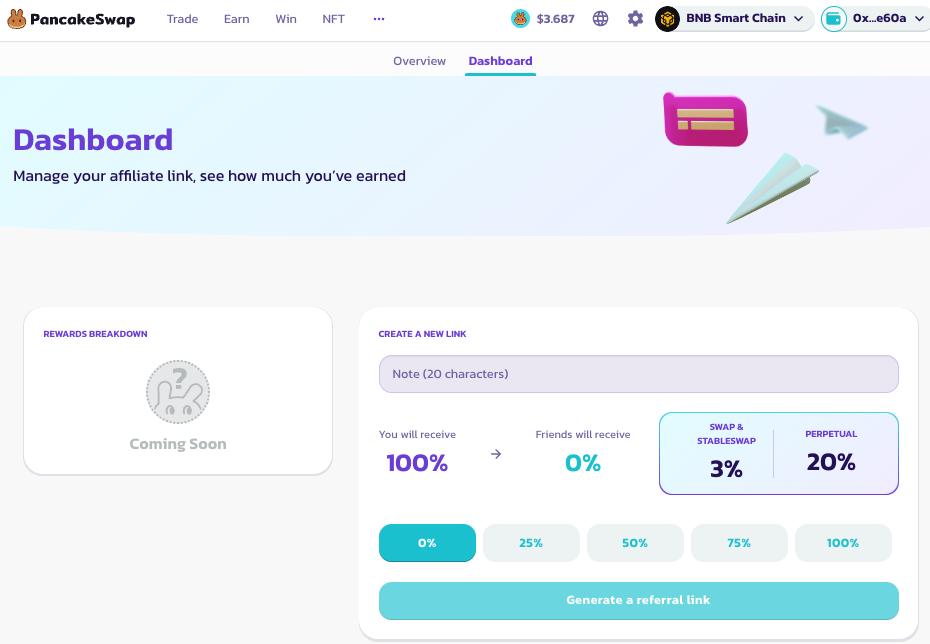
Партнёрский дашборд — это штаб-квартира партнёрской программы. Здесь ты сможешь создавать и делиться ссылками, а также отслеживать и получать награды.
Вот шаги, чтобы открыть дашборд и создать партнёрскую ссылку:
1. **Открой партнёрский дашборд**
1. Перейди на страницу [Affiliate Program](https://pancakeswap.finance/affiliates-program)
2. Войди с помощью кошелька, который использовался при подаче заявки
3. Нажми на вкладку «Dashboard»
4. Тебе может быть предложено авторизоваться. Войди с помощью выбранного криптокошелька.
2. **Создай ссылку**
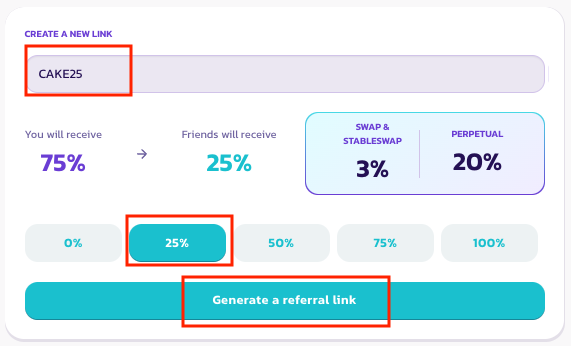
1. На странице дашборда перейди в раздел создания ссылки.
2. Задай уникальный код и ставку распределения прибыли для конкретной ссылки. Больше информации об этом можно найти [здесь](/pancakeswap/russian/archive/archived-affiliate-program/commission-structure-and-payment.md)
3. Нажми «Generate Link» и подтверди подпись. Должно появиться всплывающее окно с уведомлением о том, что ссылка создана.
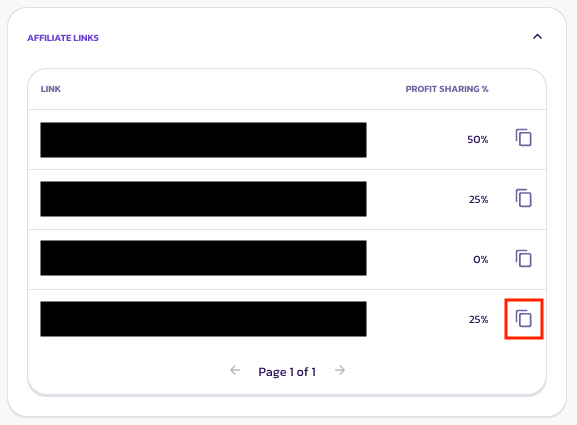
4. Перейди в раздел ссылок внизу и скопируй созданную ссылку.
Когда всё готово, ты можешь делиться партнёрской ссылкой со своим сообществом и получать комиссию, когда твои друзья торгуют на PancakeSwap. Подробнее о том, как мы определяем нового пользователя, читай на странице [Terms & Conditions](/pancakeswap/russian/archive/archived-affiliate-program/terms-and-conditions.md).
---
# Agent Instructions
This documentation is published with GitBook. GitBook is the documentation platform designed so that both humans and AI agents can read, navigate, and reason over technical content effectively. Learn more at gitbook.com.
## Querying This Documentation
If you need additional information that is not directly available in this page, you can query the documentation by asking a question.
Perform an HTTP GET request on the following URL with the `ask` and `goal` query parameters:
```
GET https://pancakeswap.gitbook.io/pancakeswap/russian/archive/archived-affiliate-program/dashboard-and-link.md?ask=&goal=
```
`ask` is the immediate question: it should be specific, self-contained, and written in natural language.
`goal` is what the user is ultimately trying to achieve, the reason they need the answer. Sharing it helps GitBook give you a better, more relevant answer. A goal is most helpful when it describes the outcome the user wants rather than restating the question. For example, with `ask=how do I create an API token`, a goal like `automate deployments from our CI pipeline` lets GitBook tailor the answer to that use case.
The response will contain a direct answer to the question and relevant excerpts and sources from the documentation.
Use this mechanism when the answer is not explicitly present in the current page, you need clarification or additional context, or you want to retrieve related documentation sections.